
Using the beket.ai MCP: Run Audits and Draft Content by Chat
What the beket.ai MCP is, how to connect it to Claude, ChatGPT, or Cursor, and the one thing to know before you let an assistant act on your account.

On this page
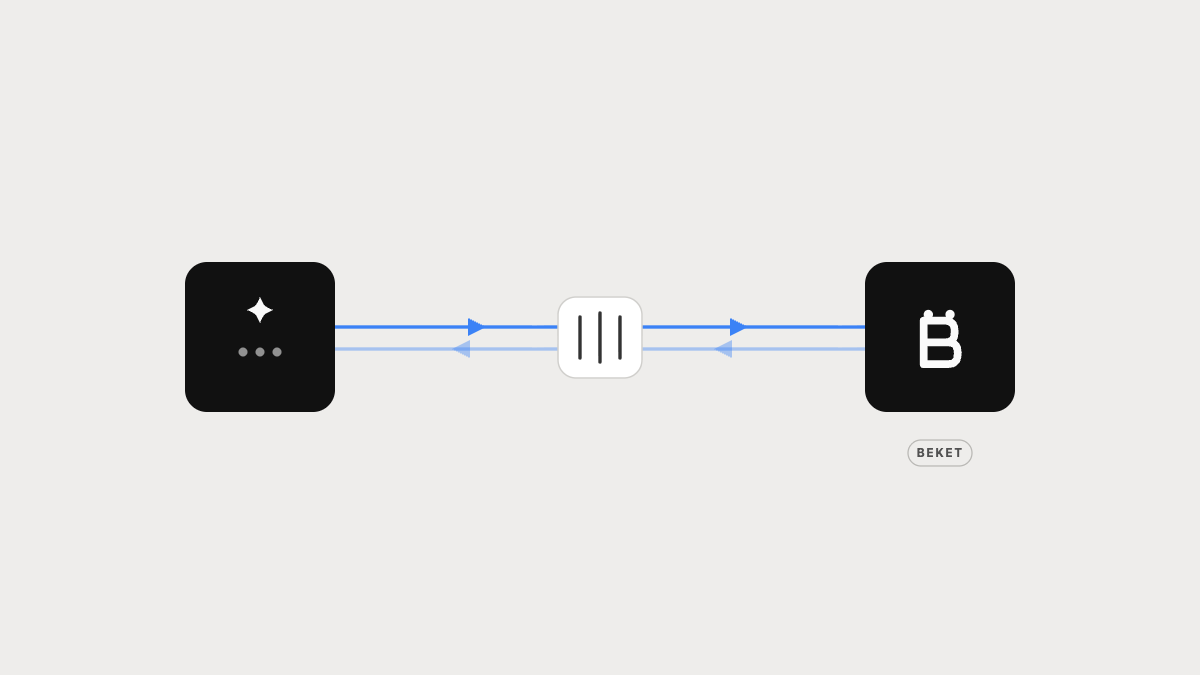
The beket.ai MCP connects your Beket account to an AI assistant like Claude. Once it’s linked, you run audits, read your results, and draft content by asking in plain language — no clicking through the dashboard, no code.
It’s a two-way link. The assistant can read your Beket data — audits, roadmaps, competitors, citations — and take actions on your behalf, like starting an audit or drafting an article. You stay in control of what it does.
What “MCP” actually means
MCP stands for Model Context Protocol. It’s an open standard, not a Beket invention — the same one many other tools use.
Before MCP, connecting an AI tool to a product like Beket meant a custom integration for each pairing. MCP replaces all of that with one shared standard. Your assistant reaches into Beket the same way it reaches into your calendar or your email.
Think of MCP as the USB-C port for AI tools. A USB-C cable plugs into a laptop, a phone, or a monitor without you thinking about it — the port handles the messy compatibility underneath. The beket.ai MCP is Beket’s USB-C port. Your assistant plugs in, and from then on it can pull data and run tasks in Beket without you switching windows.
What you can do with it
Once connected, you drive Beket by asking. A few examples of what the connector exposes:
| You ask for… | What happens |
|---|---|
| “Run an audit on our domain” | The assistant creates and starts a Beket audit |
| “How did our last audit do?” | It reads the report summary — mentions, visibility, citations |
| “Which queries are we missing?” | It pulls your winnable queries — questions where you’re absent |
| “Show our content roadmap” | It returns the ranked list of recommended content |
| “Draft the top brief” | It generates a content brief, then a full draft |
| “How do we compare to competitors?” | It reads your competitor set and portfolio analytics |
| “Track progress since last month” | It compares snapshots to show what moved |
You can also chain these. Run an audit, read the roadmap, and draft the first article — all in one conversation.
The tools
You don’t have to name tools — ask in plain language and the assistant picks the right one. But it helps to know the shape of what’s exposed. One coherent arc runs from creating an audit to acting on its results:
| Tool | What it does |
|---|---|
run_sample_analysis |
Free sample analysis of any public domain |
run_audit |
Create or reuse an audit and prepare it |
get_audit_config |
The connectors, languages and angles the run will use |
start_audit |
Run the pipeline (uses plan budget) |
get_audit_status |
Poll a run to completion |
list_audits |
Find an existing audit |
get_report_summary |
The report — mentions, share of voice, per engine |
get_winnable_queries |
Prompts you’re absent from but could win |
get_roadmap |
Prioritised actions |
get_competitors |
Who the engines name instead, and how they’re classified |
list_citations |
The sources behind the answers |
generate_content_brief |
Turn a roadmap item into a brief |
get_content_brief |
Read the brief back |
Read-only tools — everything starting get_ or list_ — never change anything. The four that spend plan budget or create records (run_audit, start_audit, generate_content_brief, and the like) are marked as writes, so your client asks before running them.
How to connect it
The connector installs on any Beket plan. On a free account one tool works — run_sample_analysis, a sample analysis of any public domain, so you can see what the engines say about you before you pay for anything. The full tool set needs a paid plan; everything else returns a plan error until you upgrade.
You sign in with your Beket account. There’s no API key to paste, and access is scoped to your organization. The connector URL is the same everywhere:
https://mcp.beket.ai/mcp
Where you paste it depends on your tool:
| Tool | Steps |
|---|---|
| Claude (web & desktop) | Settings → Connectors → Add custom connector. Paste the URL, click Connect, then log in with your Beket account. |
| Claude Code (CLI) | Run claude mcp add --transport http beket https://mcp.beket.ai/mcp, then /mcp → Authenticate. |
| Cursor | Settings → MCP → Add server. Choose an HTTP (URL) server and paste the URL. |
| ChatGPT | Settings → Connectors → add the URL. Custom connectors may require a Plus, Pro, or Enterprise plan. |
Once it’s connected, you don’t repeat setup. The connection stays until you remove it.
The one catch: it acts with your permissions
The connector isn’t a separate robot with its own keys. You sign in with your Beket account, and access is scoped to your organization — the assistant can see and do only what your account already allows.
The assistant can take real actions, so treat its requests like clicks you’re approving. Two things follow from that.
Actions are real. Starting an audit or replacing your competitor set changes your actual Beket account, not a sandbox. Your assistant should confirm before anything that overwrites data — approve those deliberately.
Your data leaves Beket. When the assistant reads a report, that data enters your AI tool’s conversation. That’s how it can reason about your results, but it’s worth knowing where the data goes.
Read this as control, not risk: nothing happens that you didn’t ask for and approve.
Your data
The connector acts only as your own organization. Every call is scoped to the audits your account owns — there’s no way to reach another customer’s data through it, and a request for an audit you don’t own is indistinguishable from one that doesn’t exist.
Beket stores what you give it — the domains and prompts you audit — and the results it produces. It does not receive or store your conversation with the assistant; it sees only the arguments of the tool calls the assistant makes.
Revoke access at any time from Settings in the Beket web app. See the privacy policy for the full account.
What to do next
- Just connected? Start read-only. Ask for your latest audit summary to confirm the link works before running anything.
- Running audits by chat? Be specific about the domain and market so the assistant doesn’t guess.
- Generating content? Review every brief and draft before publishing — the assistant produces a starting point, not a final version.
- Managing several brands? Add a separate Beket connector per account so the assistant knows which one you mean.
- Something looks off? Re-run the audit rather than trusting a stale result, and refresh the connector’s tool list if new Beket features don’t appear.
If something goes wrong
- The login opens but nothing connects — allow pop-ups and redirects to the Beket login domain.
- You get asked to log in repeatedly — remove the connector and add it again; the stored token is likely expiring without a refresh.
- A tool says the plan doesn’t allow it — the full tool set needs a paid plan.
run_sample_analysisworks regardless. - “Temporarily unavailable” — a transient upstream failure; reads retry themselves once, so try again in a few seconds.
Still stuck? Email support@beket.ai or check the Help Centre.
Where beket.ai comes in
The MCP is just a faster way in. The engine behind it is the same one that runs in the dashboard: beket.ai submits standardized queries to ChatGPT, Google AI Mode, AI Overview, Claude, and Perplexity, scores each answer against your real business data, and shows the wrong facts, the missing facts, and the sources feeding them.
Connect the MCP and you drive all of it from a chat window. Run an audit at beket.ai.
Related guides
E-E-A-T: The Trust Test Behind Google Rankings and AI Answers
A plain guide to Experience, Expertise, Authoritativeness, and Trust — with the exact tasks that prove each one.
Put Your AI Visibility Data in Data Studio: A Setup Guide for the Beket Connector
Eight steps to connect beket.ai to Google Data Studio (aka Looker Studio) — and how to tell a bad key from a bad plan from an empty audit.
How to Choose AI Search Optimization Software in 2026: A Buyer's Guide
A plain guide to AEO and GEO software — what the tools do, how the leaders differ, and the one question that sorts them.