
llms.txt vs robots.txt vs Schema Markup: What Each One Does for AI Search

In May 2026, Google’s Chrome team shipped a Lighthouse audit that checks your site for an llms.txt file. About a month later, Google’s Search team updated its AI optimization guide to say that Google Search ignores llms.txt files completely.
Both statements are true, and the gap between them explains most of the confusion about llms.txt, robots.txt, and schema markup. The three files sound like they do the same thing, “talk to the machines,” but each one has a different reader and a different job. Only one of them can remove you from AI answers by accident.
This comparison puts the three side by side, using each standard’s own documentation, so a small business can decide what’s worth an afternoon and what can wait.
Three files, three different jobs
Here’s the one-line version of each:
- robots.txt is a gatekeeper. It tells crawlers which URLs they may fetch.
- Schema markup is a label. It describes what is on a page, such as your business name, address, hours, and services, in a format machines can parse.
- llms.txt is a reading guide. It’s a short Markdown file that points AI agents to the pages that best explain your site.
The difference that matters most: robots.txt decides whether a crawler gets in. Schema and llms.txt only matter after it’s in.
llms.txt vs robots.txt vs schema markup, compared
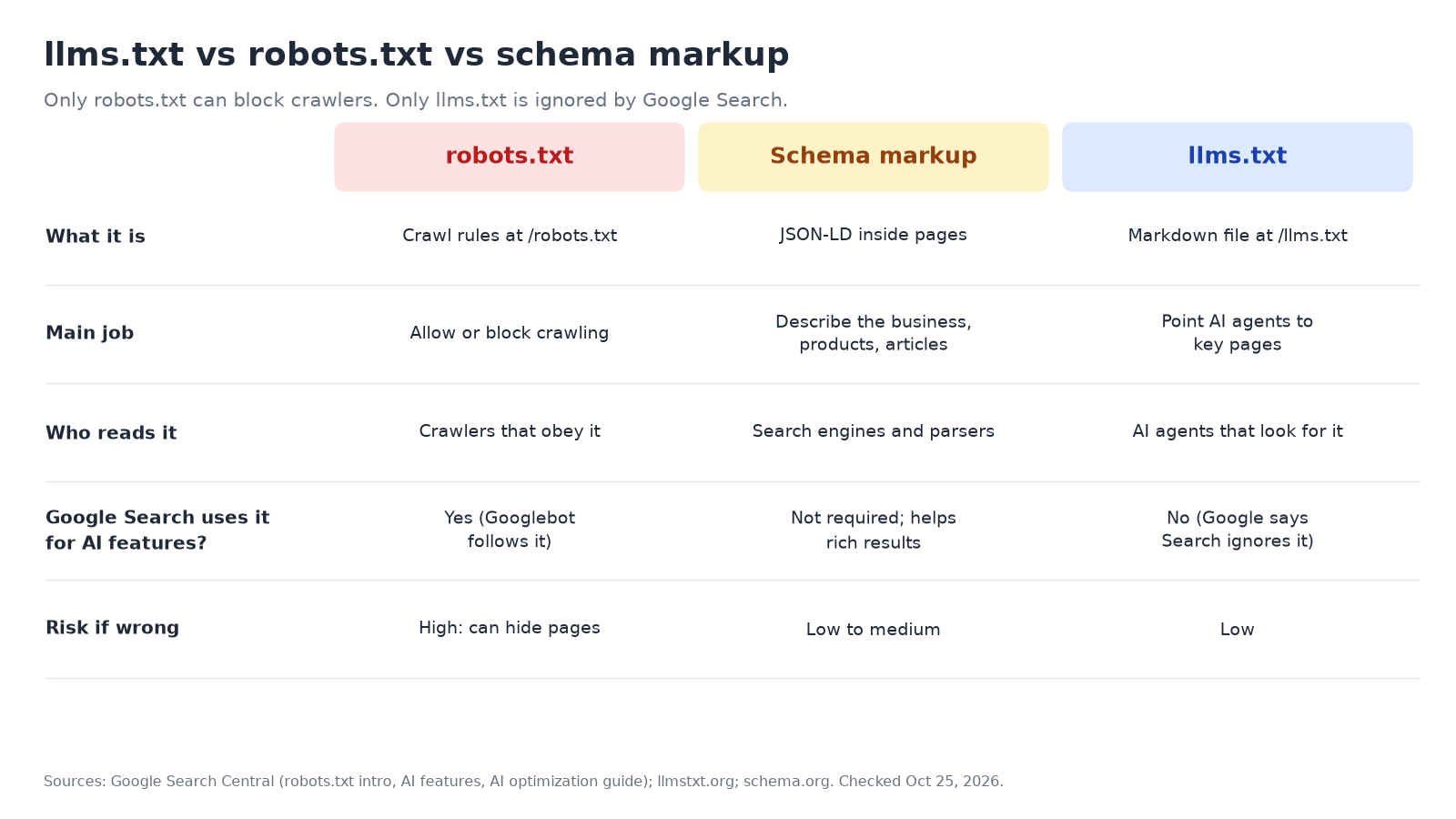
| robots.txt | Schema markup | llms.txt | |
|---|---|---|---|
| What it is | Plain-text rules at /robots.txt |
Structured data (usually JSON-LD) inside each page | A Markdown file at /llms.txt |
| Main job | Control which URLs crawlers can access | Describe the entities on a page (business, product, article) | Give AI agents a curated summary and links |
| Status | Formal internet standard (RFC 9309) | Shared vocabulary at schema.org | Community proposal at llmstxt.org |
| Who reads it | Search and AI crawlers that choose to obey it | Search engines and any system that parses the page | AI agents and tools that choose to look for it |
| Used by Google Search for AI Overviews and AI Mode? | Yes, Googlebot follows it, and blocked pages can’t be crawled | Not required; Google says it still helps with rich results | No, Google says Search ignores it |
| Risk if you get it wrong | High: a bad rule can hide pages from search and AI answers | Low to medium: wrong data can mislead, and Google wants it to match the page | Low: Google says it neither helps nor hurts in Search |
| Effort for a small business | Minutes to check | An hour or two, often a plugin | Under an hour |
robots.txt: the only one that can lock you out
Google’s robots.txt guide describes the file as a way to tell crawlers “which URLs the crawler can access on your site,” used “mainly to avoid overloading your site with requests.” It isn’t a way to keep a page out of Google; for that, Google points to noindex or password protection.
For AI search, robots.txt matters because AI answers are built from pages that were crawled. Google’s AI features documentation lists “ensuring that crawling is allowed in robots.txt, and by any CDN or hosting infrastructure” as one of the SEO basics that still apply to AI Overviews and AI Mode. To show up there as a supporting link, a page has to be indexed and eligible for a snippet.
Other AI companies use their own crawler names. OpenAI, for example, separates OAI-SearchBot, which surfaces sites in ChatGPT search, from GPTBot, which collects training data. We broke those names down in our comparison of which AI crawlers to allow in robots.txt.
A typical setup for a business that wants to be found looks like this:
User-agent: *
Allow: /

Sitemap: https://www.example.com/sitemap.xml
Two limits are worth knowing. Google notes that robots.txt rules “cannot enforce crawler behavior”; well-behaved crawlers obey them, and others might not. And a single Disallow: / under the wrong user-agent can quietly remove you from an AI engine’s search results.
Schema markup: labels that help machines read your page
Schema markup tells machines what a page is about in a fixed vocabulary: this is a Plumber, here is its address, these are its openingHours. For local businesses it’s the most practical of the three files, because it removes guesswork about the facts customers ask AI about.
Google is careful about how it frames schema and AI. Its AI optimization guide says “structured data isn’t required for generative AI search, and there’s no special schema.org markup you need to add,” but adds that “it’s a good idea to continue using it as part of your overall SEO strategy,” since it helps pages become eligible for rich results. The AI features page also asks site owners to make sure “structured data matches the visible text on the page.”
So the honest pitch for schema isn’t “add this and AI will cite you.” It’s that schema makes your core facts consistent and machine-readable everywhere they’re parsed. Our step-by-step guide to local business schema markup covers which types to use and how to test them.
llms.txt: a reading guide some AI agents look for
llms.txt was proposed by Jeremy Howard in September 2024, and the proposal was updated to a v2 in August 2026. The idea: web pages are built for people, wrapped in navigation and scripts, so a short Markdown file at your site root can give AI agents “brief background information, guidance, and links to detailed markdown files.”
The format is simple. The only required part is an H1 with your site’s name. After that come an optional one-line summary in a blockquote, optional notes, and lists of links under H2 headings. Here’s an example for a made-up plumbing company:
# Example Plumbing Co.

> Licensed residential plumbers serving Seattle since 2009. Emergency service 24/7.

## Services
- [Water heater repair and replacement](https://www.example.com/water-heaters): Tank and tankless, same-day in Seattle
- [Drain cleaning](https://www.example.com/drains): Camera inspection included

## About
- [Service area and hours](https://www.example.com/contact)
- [Licenses and insurance](https://www.example.com/about)
Where llms.txt is actually used today, according to its own proposal, is mostly software documentation, where coding agents follow it to find API references. The proposal says thousands of sites publish one, that tools such as Yoast SEO, AIOSEO, and Wix can generate it, and that AI labs publish llms.txt files for their own developer docs.
The search engines are a different story:
- Google Search ignores it. Google’s guide lists llms.txt under things “you can ignore for Google Search.” It says “Google Search itself doesn’t use them,” while noting that maintaining one for other systems “will neither harm nor help your site’s visibility or rankings in Google Search.” Search Engine Land covered that update in June 2026.
- Chrome checks for it. Lighthouse’s experimental Agentic Browsing category calls llms.txt “an emerging convention.” It marks a missing file as Not Applicable, because “providing the file is optional at the moment,” and flags server errors. That audit is about AI agents browsing your site, not search rankings or AI citations.
- Other AI search engines haven’t said. As of October 25, 2026, we couldn’t find documentation from OpenAI, Perplexity, or Microsoft saying their search products use llms.txt to choose which sites to cite. Treat claims that it boosts AI citations as unproven.
Which one should a local business do first?
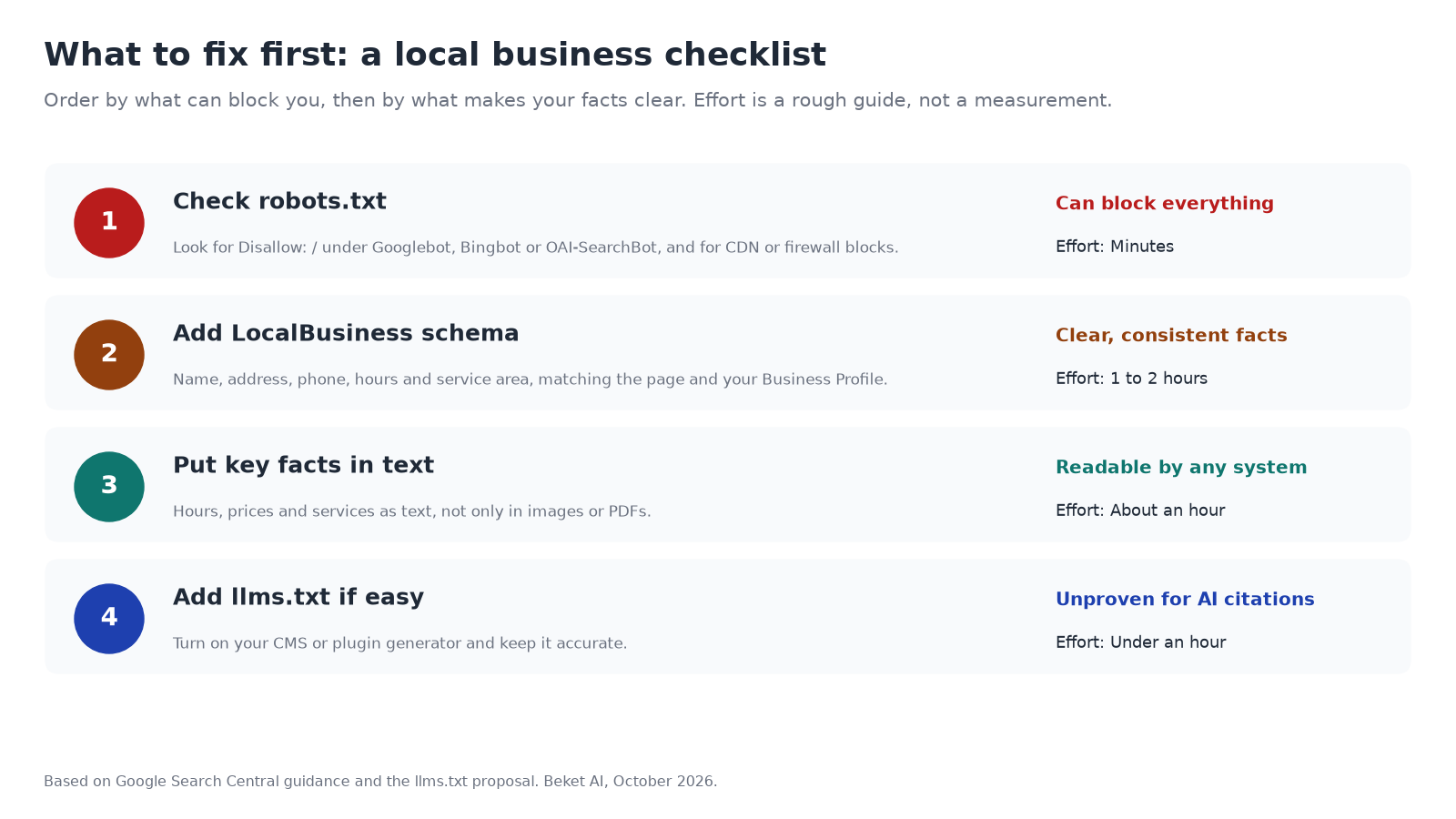
If you only have one afternoon, work in this order. Each step protects the one after it.
- Check robots.txt. Open
yourdomain.com/robots.txtand look for anyDisallow: /lines, especially under Googlebot, Bingbot, or OAI-SearchBot. Also check that your host or CDN isn’t blocking crawlers at the firewall. This is the only step that can undo all the others. - Add or fix LocalBusiness schema on your homepage and contact page: name, address, phone, hours, and service area, matching what’s visible on the page and on your Google Business Profile.
- Make the facts readable as text. Google’s AI features page asks for important content “in textual form.” Hours inside an image or prices inside a PDF are harder for any system to use.
- Add llms.txt if it’s easy. If your CMS or SEO plugin generates one, turn it on and keep it accurate. It costs little, and Google says it won’t hurt. Just don’t expect it to change what AI Overviews or ChatGPT say about you.
Three common mix-ups
“llms.txt is the new robots.txt.” It isn’t. The llms.txt proposal itself says the two “have different purposes”: robots.txt says what access is acceptable, while llms.txt is read on demand when an agent needs information. Crawl rules like Disallow aren’t part of the llms.txt format.
“Blocking AI in robots.txt keeps me out of AI Overviews.” Not on its own. Google says AI is built into Search, so robots.txt rules for Googlebot are the crawl control, and it points to Google-Extended only for training and grounding in some of its other systems. To limit what appears in AI features, Google points to nosnippet, max-snippet, or noindex. We explained the trade-offs in our post on Google’s AI Overviews opt-out control.
“Schema is how you get into ChatGPT.” No published source says that. ChatGPT search builds answers from search results and its own index, as we covered in how ChatGPT search works. Schema helps make your facts clear, but OpenAI doesn’t publish its ranking factors.
The bottom line
robots.txt decides whether AI engines can see your site, so check it first. Schema makes your business facts clear and consistent, and it’s worth having for regular search anyway. llms.txt is a cheap, harmless extra that matters most for AI agents and documentation sites, and Google Search doesn’t use it.
None of the three tells you whether AI actually recommends you. For that you have to ask the engines. A free Beket AI audit runs 25 prompts across three AI engines and shows where your business appears in the answers.
Related posts
How ChatGPT Search Works: How It Finds, Indexes, and Cites Websites
How ChatGPT search decides to search, rewrites queries, pulls from OpenAI's own index and partner providers, and what the Cloudflare pilot changed.
How to Track AI Overview Traffic in Search Console and GA4 (and What You Can't See)
A step-by-step guide to tracking Google AI Overview and AI Mode traffic with Search Console's Generative AI report, GA4, and manual checks, plus a checklist.
Bing AI Performance Report: How to See When Copilot Cites Your Site
How to set up and read the Bing Webmaster Tools AI Performance report, map grounding queries to pages, and use Topics Portfolio to find citation gaps.